
10 Ways to Use ChatGPT with Project GLAD®

Teaching is deeply creative work—and also incredibly time-consuming. Preparing chants, writing expert groups, creating pictorial input charts, awards, ELD questions, and frames can take hours of brainstorming, researching, and formatting.
This is where ChatGPT becomes a game-changer.
It is not a replacement for teaching—it's a productivity partner that can help you save prep time, expand your options, and enhance the quality of your instructional tools.
Below is a practical guide for how ChatGPT can support you in designing GLAD® strategies -personalized to your grade level, standards, and classroom needs.
Two hints before we begin:
- ChatGPT works best with very specific prompts. Some of these sample prompts will get you started, but the more specificity you include the more likely it will align with your goal.
- The more you use the tool, the better you (and ChatGPT) will become at streamlining just the right prompt (and product) for your purpose.
We'll start with the most obvious and build from there...
1. CREATE CLASSROOM CHANTS
Chants build fluency, automaticity, engagement, and long-term memory. You can ask ChatGPT to:
✨ Make Content and Vocabulary-Rich Chants
You can request:
-
Science chants
-
Social studies chants
-
Grammar chants
-
Math chants
-
SEL chants
SAMPLE PROMPT: “Write a chant or song that uses rhyme and repetition about the phases of the moon and includes the words waxing, waning, gibbous, and tides."
This aligns beautifully with GLAD®’s low-affective-filter, high-engagement design.
2. DESIGN LITERACY AWARDS
The Literacy Awards section of GLAD® (see pages 33–38 in your Learning Guide) provides a powerful aid in reinforcing the Three Personal Standards and content/literacy. ChatGPT can:
✨ Create engaging and content rich awards
-
Basic awards with interactive elements
-
Bookmarks
-
Real life images
-
Mini notebook covers
-
Culturally inclusive examples
SAMPLE PROMPT: “Create 10 Literacy Awards based on the uploaded examples for a 4th-grade science unit about organism structures and functions for a dandelion, pine tree, bee, chipmunk, and bear. Make sure each Literacy Award is grade level appropriate and have an interactive element." (Attach a page of literacy examples from your Learning Guide or another unit and watch the magic happen.)
3. DRAFT A TEACHER-MADE BIG BOOK IN MINUTES
Big Books require:
-
Repetitive language
-
Predictable structures
-
Standards-based vocabulary
-
Strong visuals (which ChatGPT can generate separately through image tools)
SAMPLE PROMPT: “Write an early-literacy book about the water cycle with a predictable pattern, a repetitive phrase on each page, and includes the vocabulary precipitation, condensation, evaporation, and accumulation."
You can also request:
-
Page-by-page text
-
Sketch suggestions
-
Story vocabulary
-
A sentence pattern that repeats (GLAD-friendly!)
- A glossary, table of content, and/or index
4. TRANSFORM TEXT: EXPOSITORY TO NARRATIVE (for a Narrative Input Chart)
ChatGPT can shift genre depending on your instructional goals.
✨ Transform expository/informational text into narrative
SAMPLE PROMPT: “Turn this informational paragraph on the water cycle into a short narrative story told from the point of view of a water droplet.”
✨ Insert key vocabulary
SAMPLE PROMPT: “Insert Tier II vocabulary (give specific vocabulary words) into this narrative text and bold the added words.” (Or provide specific vocabulary you want included.)
5. CREATE GRAPHIC ORGANIZERS
For example:
-
Timelines
-
Hierarchy charts
-
Life cycle diagrams
-
Flow charts
-
Cause/effect maps
These align with the Graphic Organizer section from the Learning Guide (p. 83–87).
SAMPLE PROMPT: “Create a simple timeline (give specific dates) with 10 major events for a unit on the American Revolution, written in accessible language for 5th grade. Include a realistic picture for each event. (Honestly, I haven't had much success yet with Chat and images. I need to practice with the image prompts. In the meantime, it may be faster to get your images from Google or Canva, especially if you're looking for several images.)
6. DEVELOP THE PROCESS GRID
Process Grids help students compare and synthesize information across expert groups, but they take time to build. ChatGPT can streamline the whole process.
✨ Generate Categories
Ask ChatGPT to suggest parallel, grade-appropriate categories for your topic.
SAMPLE PROMPT: “Create four Process Grid categories for a 4th-grade unit on animal adaptations based on 4th grade NGSS and CCSS.” (Another HUGE hint. I upload the strategy notetaking template from my Learning Guide for the strategy I want help with. You can also upload an image of the Process Grid outline to add even more specificity.)
✨ Choose your topics (animals) and have ChatGPT fill in the Process Grid
Provide your categories and species/topics, and ChatGPT will generate clear, factual statements that align across groups.
SAMPLE PROMPT: “Using these categories, write 3–4 facts for penguins, camels, polar bears, and dolphins.”
7. CREATE A PICTORIAL FROM PROCESS GRID CATEGORIES
You can ask ChatGPT to:
✨ Integrate the top row of your Process Grid into a visual representation
Provide specific directions such as:
-
Where to place images
-
Arrows
-
Labels
-
Color suggestions
SAMPLE PROMPT: "Create a simple image of a scene that integrates key information from each category: (Then I copied and pasted a row from our Process Grid)."
Here is the image ChatGPT generated. Simple and a practical image structure for a pictorial. All that's needed is the categories and content. Could you make the image more specific? Absolutely! Just keep adding prompts.
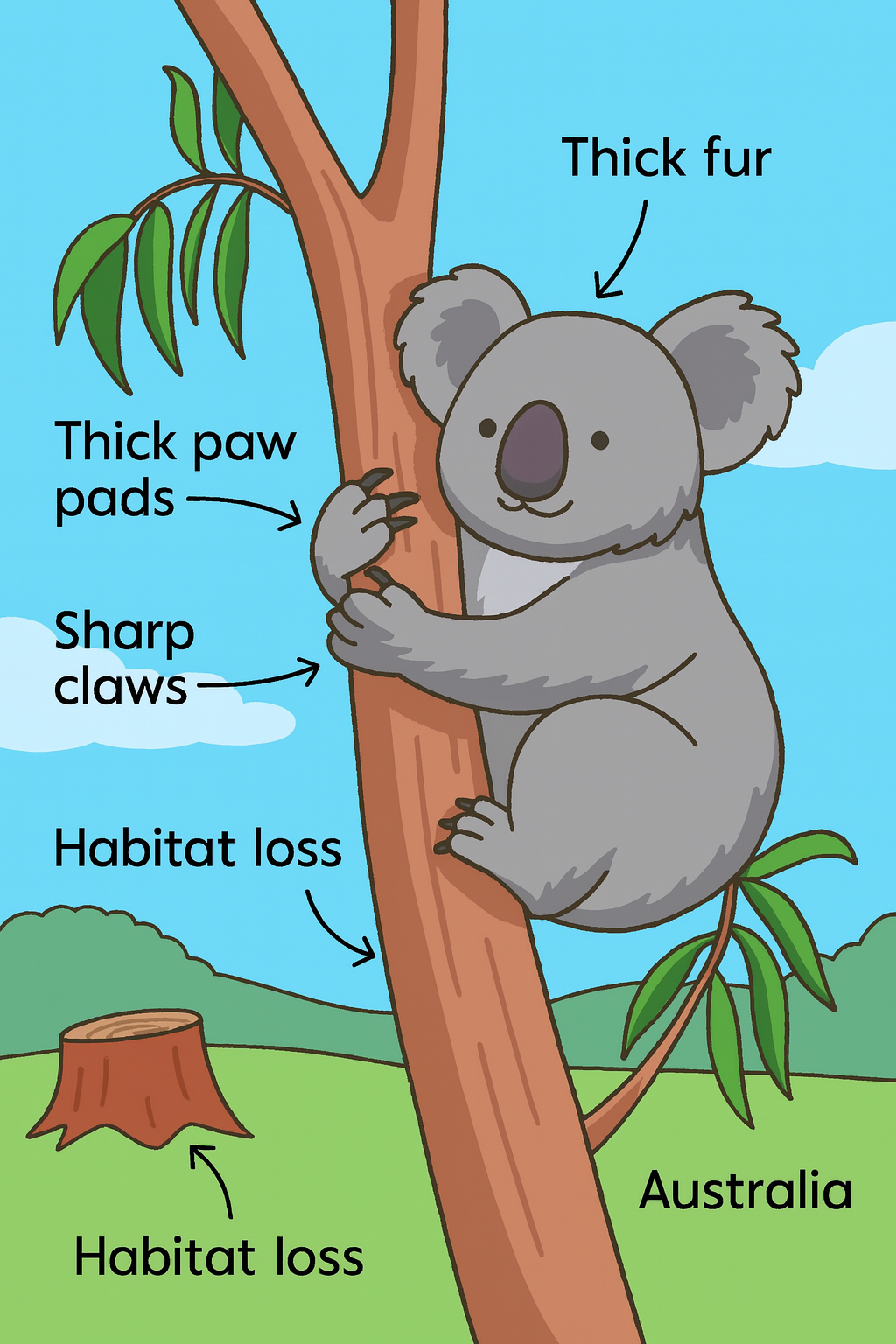
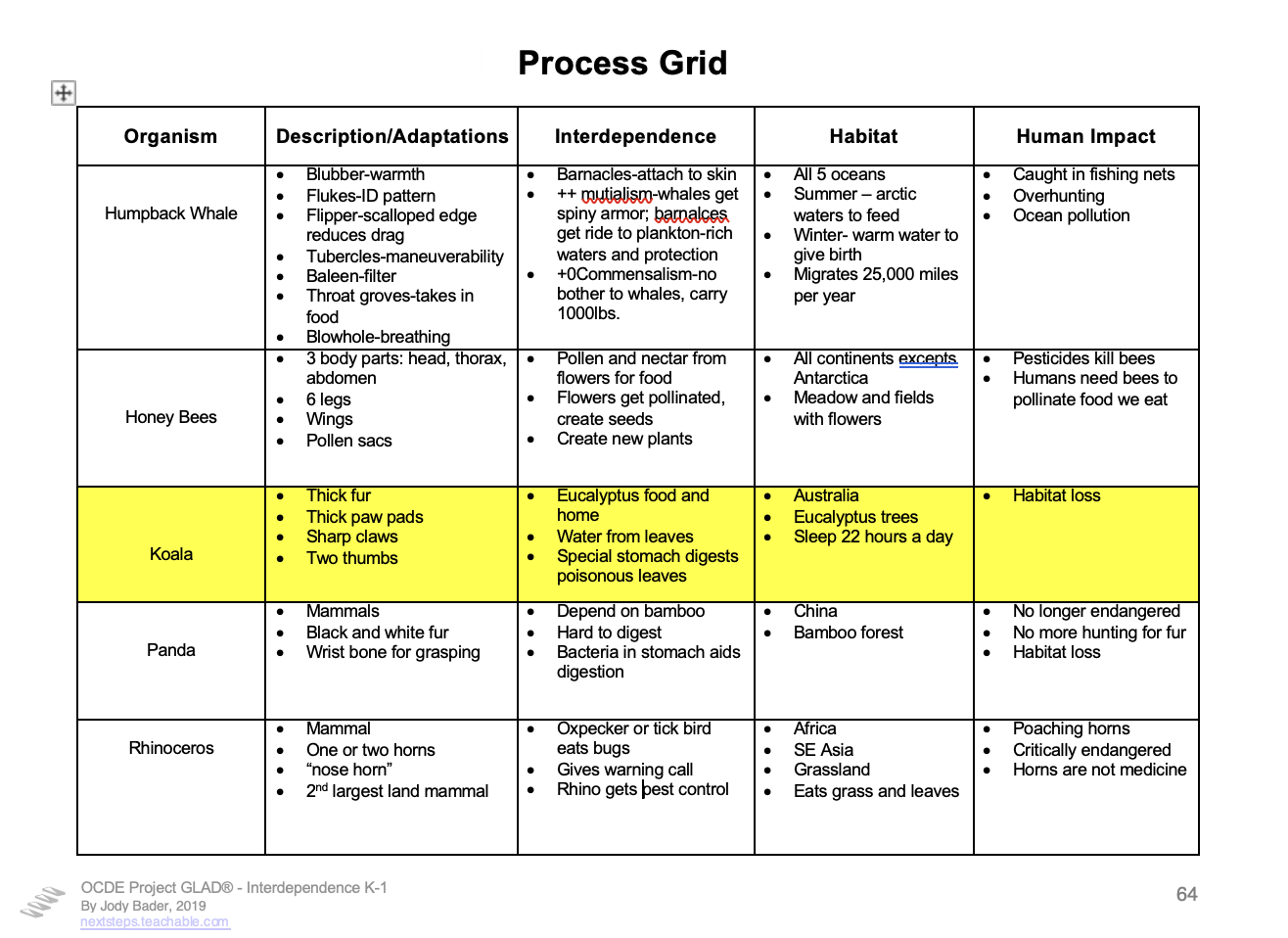
HINT: A strong Ai image generator is PixelDojo. You can combine the two tools by asking ChatGPT to "provide a prompt to use with PixelDogo to create a scene illustrating the information from each of the following categories about the Koala: (cut and paste your Process Grid row info into ChatGPT.)" The prompts ChatGPT produces are detailed and result in beautiful images when used with PixelDojo.
8. BUILD EXPERT GROUP TEXTS QUICKLY AND CLEARLY
Expert Group texts should be:
-
Content-rich
-
Grade-appropriate
-
Parallel in structure across groups
-
Scaffolded with academic vocabulary
-
Designed for comprehension + note-taking
✨ Write grade level Expert Group text
SAMPLE PROMPT: “Create four Expert Group texts (upload strategy page for Expert Groups) for 5th grade reading level about the American Revolution, with a paragraph (specific about how many words per paragraph) for each of the following categories and content aligned with (your state) social studies standards for 5th grade.
Causes, Key People, Daily Life, and Major Events.
Match reading complexity across all four texts and include clear subheadings.”
9. Create Questions for an ELD Review
The ELD Review strategy requires and understanding of:
-
Bloom’s Taxonomy or Depth of Knowledge
-
ELD Proficiency Levels
-
Language supports
-
Scaffolded question sequences
ChatGPT can create:
-
Questions for each proficiency level
-
Sentence stems
-
Checks for understanding
SAMPLE PROMPT: “Create 5 ELD Review questions for my WIDA Level 2 - Emerging language learners, and 5 ELD Review Questions for my WIDA level 3 - Developing language learners based on the attached pictorial input chart. Each question should include various ways to ask the question specific to that language level but also corresponding with each different level of Bloom's Revised Taxonomy."
Hint: I like to upload a copy of the pictorial input chart to support the process. Another helpful document to upload is the ELD Group Frame grid and ask ChatGPT to fill in the chart based on content from the attached Pictorial. It won't fill in every cell in the chart but it will give you a good start!
10. ANALYZE ELD GROUP FRAMES AND SUGGEST NEXT STEPS
ChatGPT can look at your student language samples and provide:
-
Analysis of language patterns including corresponding connections to your state's ELD Proficiency Levels
-
Suggested language targets
-
Errors vs. developmental approximations
-
Recommended next steps using GLAD® strategies
-
Appropriate sentence frames for next instruction
SAMPLE PROMPT: “Here is an ELD group frame with student responses. Analyze the language, identify next instructional steps, and recommend frames for the next lesson based on (your state's) English Language Development Standards.”
This aligns with the ELD Review section describing how oral language proficiency is monitored across a unit.
Teaching is creative. But teachers deserve tools that accelerate creativity—not replace it.
ChatGPT can help you:
-
Reduce prep time
-
Increase consistency across strategies
-
Improve language scaffolds
-
Personalize lessons to your actual students
-
Maintain alignment with GLAD® and ELD practices
-
Make learning more accessible, visual, and joyful
When used wisely, ChatGPT becomes your:
✨ co-planner
✨ drafting assistant
✨ language coach
✨ sketch-layout generator
✨ idea expander
✨ equity amplifier
✨ time saver
Our list of ideas is by no way exclusive. What other ways have you found ChatGPT to be helpful with your Project GLAD® preparations?
THESE TIPS ARE GREAT!
I want to receive them once a month!
Author

Jody Bader
Jody Bader is an educator with two decades of experience as a classroom teacher, ELD specialist, instructional coach, education researcher, and one of the Northwest’s leading OCDE Project GLAD® Consultants. She has worked with teachers in the US and internationally who are committed to improving their practice and the culture of their classrooms for all students through the OCDE Project GLAD® model. She has trained and coached thousands of teachers and has a passion for mentoring new trainers in training.
Author

Dr. Sara Martinez
An educator for nearly 20 years, Dr. Sara Martinez has worked with individuals from preschool through adulthood. She has extensive experience and background in education among English language learners and individuals in low socioeconomic status environments, combined with her doctoral work and experience in leadership development and change dynamics. Having trained and consulted with thousands of K-12 teachers and administrators, she has a wide base of knowledge and educational experience.
